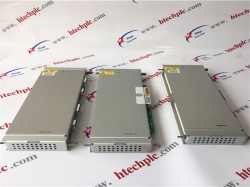
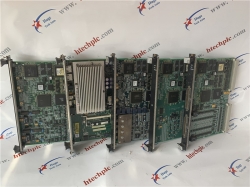
Ge Multilin 369-hi-0-0-0-0
For sale
Alabama, Auburn, HONGKONG
Published by: AMIKON LIMITED
$
520.00
USD
AMIKON LIMITED
Sales ManagerNancy
Emailinfo@amikon.cn
Whatsapp/Skype + 8618020776786
Website www.amikon.cn
Advantage Brands
Allen Bradley Reliance,SLC500/1747/1746,Logix5000/1756,PLC-5/1771/1785
ABB DSQC series,H&B Freelance,Bailey
Bently Nevada 3500 System spare parts ,3300 System spare parts
Yokogawa DCS
Honeywell DCS
Ovation 1C31234G01/1C31227G01/1C31166G01/1C31116G01/1C31189G01 etc DCS System spare
GE IC693/IC697/IS200/DS200/IS215
Triconex 3700A/3805E/3604E/3503E/3504E/3008/4119A/8312/3703E/3511/
Schneider 140 PLC series 140CPU67160/140CRP93200/140CPS11420
AMIKON LIMITED to the professional, integrity, innovation, cooperation, win-win
business philosophy, and constantly develop new products, to provide quality services, in order
to maximize the pursuit of customer satisfaction, and constantly open up new areas of business for customers.
12.4 FANUC FILES
BACKUP PROCEDURE
Please prepare the compact flash card.
I. Step
(Prepare operation)
1. Smoothly put the COMPACT FLASH CARD inside the M-CARD slot of LCD.
2. Press “EDIT” button to change to edit mode.
3. Press “SYSTEM” key on the MDI panel until parameter screen comes ou.t
4. Press “+” twice using the soft key until ALL IO displays below the LCD.
5. Press “ALL IO”.
(Backup the parameter)
6. Press “< ” to return to the previous page.
7. Press “PARAM” soft key on the LCD screen.
8. Press “OPRT” soft key.
9. Press “PUNCH” soft key.
10. Press “EXEC” soft key (OUTPUT will be display on the screen, all the parameter
will output to the Flash Card as CNCPARAM.DAT).
(Backup the MACRO)
11. Press “< ” to return to the previous page. Backup of data files procedure
12. Press ”+” soft key to change to the next page.
13. Press “MACRO” soft key.
14. Press “OPRT” soft key.
15. Press “PUNCH” soft key.
16. Press “EXEC” soft key (OUTPUT will be display on the screen, all the macro variables
will output to the Flash Card as MACROVAR.DAT).
(Backup the PITCH)
17. Press “< ” to return to the previous page.
18. Press “PITCH” soft key on the LCD screen.
19. Press “OPRT” soft key.
GE Multilin 369-HI-0-0-0-0
GE Multilin 369-HI-0-0-0-0
GE Multilin 369-HI-0-0-0-0
Moore 3320
Moore 3450
Moore 3810
3830 6FX1122-1AC02 03831-A
Moore 06800-A
104PW161 MP270 TP270 16260891
Moore 13679-555
Moore 14755-123
Moore 14755-27
Moore 150-3KB61
15499-146/8
15499-147/8
15669-36-5 15669-1-15
Moore 15736-69
15736-72 15484-11-4
15736-75 15484-11-4
Moore 15737-134
Moore 15738-119
Moore 15738-120
Moore 15738-71
15768-112 15768-112 BBB
15768-113R 15768-113 BBB
15770-202 15770-202 BBB
15770-217 15770-217 BBB
15770-220 15770-220 BBA
15819-107 15819-107 BBF
15819-131 15819-131 BBG BBF BBD
15824-101 15824-101 BBC
15824-112 15824-112 BBC
15824-113 15824-113 BBC
15853-1 15853-1 BBA
15853-12 15853-12 BBB
15853-31 15853-31 BBB
15854-31 15854-31 BCF
15854-33 15854-33 BBB
15854-35 15854-35 BBB
15854-51 15854-51 BCF
15854-53 15854-53 BBB
15854-62 15854-62 BCF BCG
15854-63 15854-63 BBB
15854-64 15854-64 BBB
15854-69 15854-69 BDD
15899-1 15899-1-7
Moore 15923-51-2
Moore 15936-1
Moore 15936-11
Moore 15942-15
15945-31 15945-31 BBF
15950-1 15950-1 BBB
15950-23 15950-11
15954-1 15954-1 BBC
16005-1 16005-1
Moore 16040-6
Moore 16042-11
16069-121 16069-121-4
16069-51 16069-51-7
Selectron AIC711
Selectron AOC711
Selectron CPU40
Selectron CTA701
Selectron DIM40
Selectron DIOC711
Selectron DIT701
Selectron DOM40
Selectron PLC256
Selectron PMC22
02408042-5 TYP DZ 52-SL
02408341-7 DZ 12-SL
31210048 UNG 24 (B)
31313076 UCN 20 BSA
31409245 UBA 32 12A
31409246 UBE 32 10D
31812612 UPI 3DIA
P02-A16/1
P02-A16/2-101
P02-CPU/1A 72610100
P02-CPU/3
P02-E16/2
P02-E32/1
P02-E8-A8/1
P02-SK 1/32
PDPS 20 88270675
RIO16I 36414099107
Views: 200
Report Ad
Report type *
Your Email *
Report Message *
Please stay SAFE
- DO NOT SEND MONEY USING Western Union or MoneyGram TO PERSONS OR COMPANIES YOU DO NOT KNOW. WE WON'T BE ABLE TO GET YOUR MONEY BACK.
- Do not extend payment to anyone you have not met in person
- Never give out financial info (bank account, social security, paypal account, etc)
- Keep things local by meeting face to face
- Beware offers involving shipping - deal with locals you can meet in person
- Transactions are between users only, no third party provides a "guarantee"
- Don't carry large sums of money with you the first time you meet someone. For expensive items, go to the bank with the seller to make the payment
- Our advice is to pay only when the product is delivered (cash on delivery)
- Most scammers will try to lure you away from our website. Perhaps even by adding email addresses or phone numbers to their pictures or message. They do it to avoid our checks. So avoid them.
- DEAL LOCALLY, FACE-TO-FACE - follow this one rule and avoid 99% of scam attempts.
- IMPORTANT - Made live phone video calls with the owner to ensure that the owner has the product listed.

Recent ads »
Electronics » Other Electronics